Morning! 😃 ☕️
Halfway through the week.
The length check is still gone from yesterday - and today the heart of the loop disappears too. About half the function is blank now.
Before you scroll, try saying the missing lines out loud. Even a whisper over your coffee counts - speaking a line is a different muscle from reading it, and it's the one that sticks.
In today's email...
-
🐍 Day 3: The loop's inside vanishes - half the function is blank
-
💭 How a
forloop hunts through the password -
🔍 Eight characters, one at a time, with the flag after each
-
☕ Paste your version and watch Ada run it
THE FUNCTION 🐍
def check_password(password):
    ____________________
        ____________________
    has_number = False
    for char in password:
        ____________________
            ____________________
    if has_number:
        return "Strong"
    return "Medium"
TODAY'S LINE 💭
The two new blanks live inside the loop:
        if char.isdigit():
            has_number = True
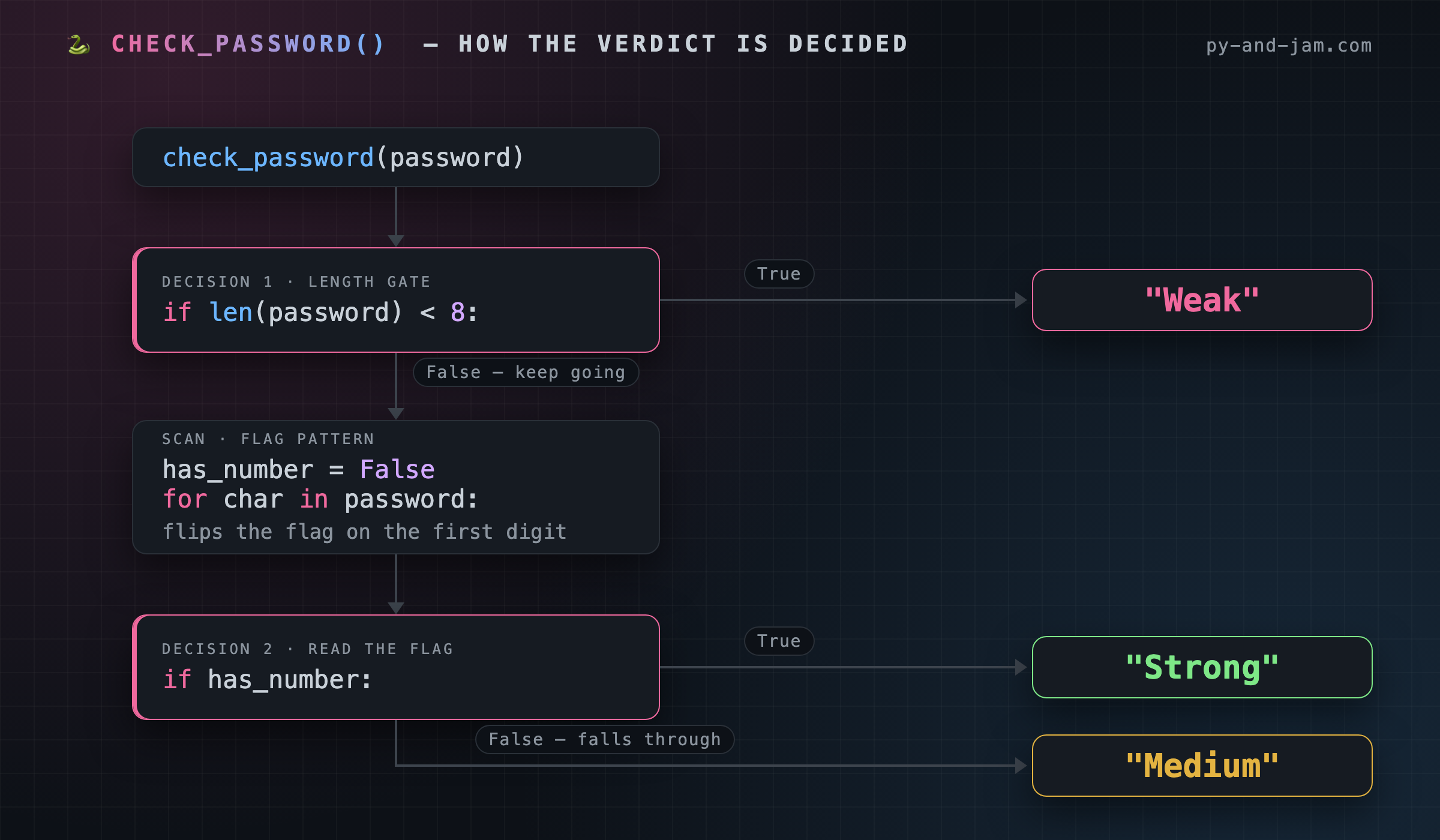
The line still showing above them - for char in password: - is the loop itself. It takes the password and hands you its characters one at a time, calling each one char. First the loop sees "S", then "u", then "n", and so on to the end.
Each time through, the blanked lines ask a question: if char.isdigit(): - "is this character a digit?" The moment the answer is yes, has_number = True records it. Once it's True, it stays True, even if every character after it is a letter.
That's the everyday shape of a loop: set up an answer before you start (has_number = False, still visible on line 4), then walk the data and update the answer as you learn more. You now have both halves - the setup and the search.
TRACE IT 🔍
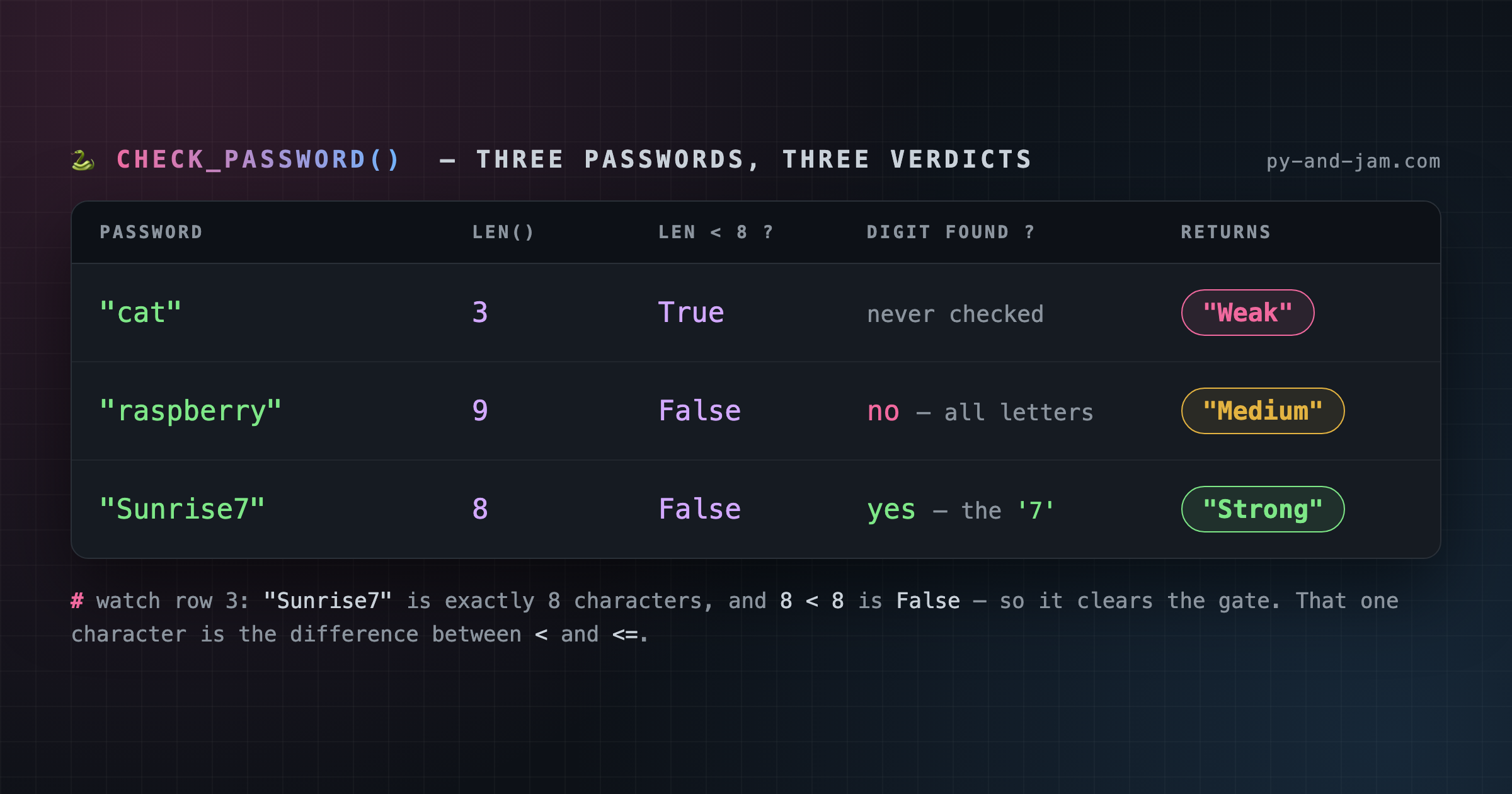
Here's the loop running on "Sunrise7". The last column is what has_number holds after that pass:
pass    char    char.isdigit()    has_number after
----    ----    --------------    ----------------
 -       -            -           False   <- line 4, before the loop
 1      "S"         False         False
 2      "u"         False         False
 3      "n"         False         False
 4      "r"         False         False
 5      "i"         False         False
 6      "s"         False         False
 7      "e"         False         False
 8      "7"         True          True    <- the flag flips here
Seven passes changed nothing at all. That's normal, and it's fine - the loop's job is to look, not to find. The eighth pass is the one that pays.
And notice what would have happened with "7Sunrise": the flag flips on pass 1 and then rides out the next seven passes untouched. Same answer, different pass. The flag doesn't care where the digit was.
COMMON BUG 🐛
The tempting shortcut is to return straight out of the loop. Half of that works. The other half is a trap:
    for char in password:
        if char.isdigit():
            return "Strong"
        return "Medium"
The return "Strong" is fine - a digit really does settle it. But return "Medium" sitting inside the loop fires on the first character that isn't a digit. Run that on "Sunrise7" and you get "Medium", because "S" ended the function before the "7" was ever reached.
The rule: inside a loop you can safely return as soon as you're certain. You can't return "I didn't find it" until the loop is over - and that's exactly why the flag exists.
WHY IT MATTERS 🧠
"Set a starting answer, walk the data, update the answer" is the most reused loop shape in programming. Counting items, finding a maximum, checking whether any row failed, totalling a cart - they're all this same skeleton with a different question in the middle.
Learn it once here and you'll recognise it in every codebase you ever open.
WITH ADA ☕
Fill the loop back in from memory, then take the whole thing to Ada at py-and-jam.com and let her run it.
This is the real test: if your loop is right, "letters" comes back one way and "letters1" another - that single 1 is what your loop is hunting for. Watch it land.
LEVEL UP 🚀 Python has a one-liner for exactly this pattern:
has_number = any(char.isdigit() for char in password)
That replaces lines 4 through 7 outright and does the same job. Write the long version until it's automatic, then reach for the short one - because the short one only reads well once you know what it's hiding.
ANSWER KEY ✅
Blanked today: lines 2, 3, 6 and 7 - the length check and the digit check inside the loop.
Today's new blanks:
        if char.isdigit():
            has_number = True
The full function:
def check_password(password):
    if len(password) < 8:
        return "Weak"
    has_number = False
    for char in password:
        if char.isdigit():
            has_number = True
    if has_number:
        return "Strong"
    return "Medium"
See you tomorrow - only the verdict lines are left to fade. 🐍 The Py & Jam Team
There's a better way to learn.
Py & Jam delivers one memorable disappearing function to your inbox daily. It’s a simple, effective way to build fluency without the frustration.